
Skip to content
sbtpg logo
  • Products
    Digital payment
    COLLECT TAX PREP FEES
    Refund Transfer

    Offer a pay-by-refund option

    Auto Collect

    Collect past-due tax preparation fees

    Credit and Debit Card Processing

    Accept payment by credit card or debit card

    Cash
    INCREASED CASH FLOW
    Software Purchase Assistance

    Buy tax software with a no cost loan

    Pre Season Funds

    Get an advance before tax season

    Simply Paid

    Get paid early with a fee advance

    revshare
    GET PAID FOR REFERRALS
    Tax Debt Resolution

    Help clients with tax debt

    Yendo Credit Card

    Offer a vehicle-secured credit card

    Satisfied
    PRODUCTS FOR YOUR CLIENTS
    Fast Cash Advance

    Offer a refund advance loan

    Fast Forward

    Give clients early access to their refund

    Green Dot® Prepaid Visa® Card

    Help clients receive their refund fast

    Approved notification
    TOOLS FOR TAX PROS
    NEW! AI data entry

    Prepare returns faster than ever with AI

    Cybersecurity

    Safeguard client data and protect your practice

    Process more tax returns
    MARKETING RESOURCES
    Marketing Pro

    Power your marketing campaigns

    Marketing Materials

    Access promotional resources

    Marketing Playbook

    Unlock free marketing tips and tricks

    Successful ERO

    Upgrade now

    See all we offer tax pros

    Discover the difference
  • Support
    • Help
    • Contact us
  • About us
    • About us
    • News
Log in
Enroll now

How to enroll with sbtpg

Instructions for Crosslink customers

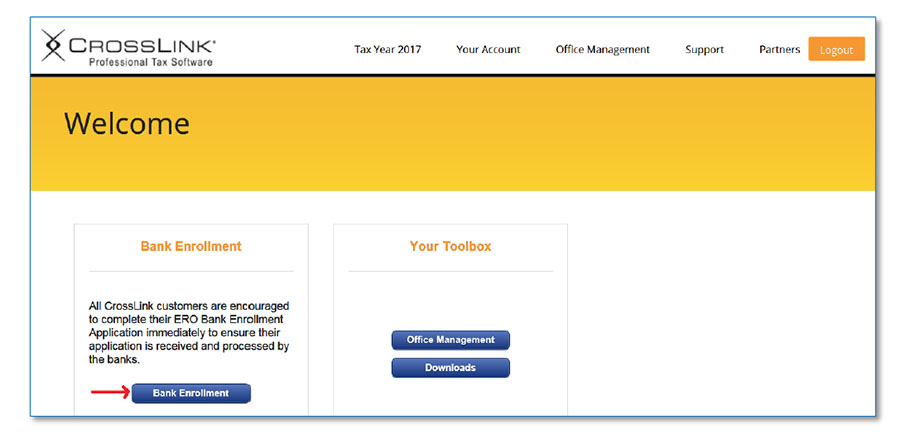
Step 1

To access and complete the ERO Bank Enrollment Application for your EFINs you must be logged into your Customer Portal site. Select "Bank Enrollment".
logon

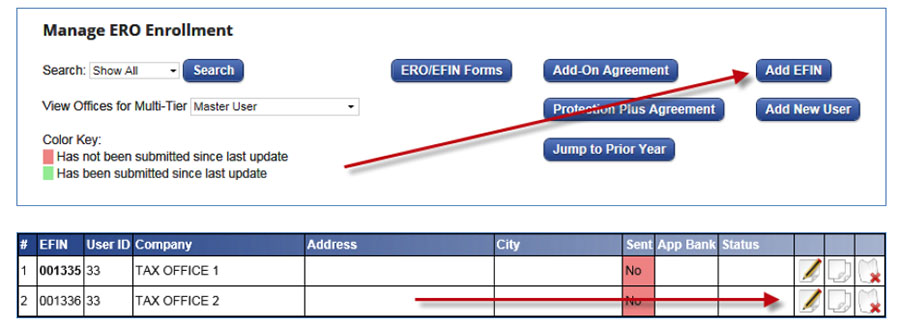
Step 2

If this is a new EFIN click on the "Add EFIN" button otherwise find your EFIN in the EFIN list by using the EFIN Search and click the Edit EFIN/App icon. 

Note: The Master-EFIN must be Added and Registered first before adding and registering the Sub-EFIN. Master EFINs are denoted by being bolded. 
manage

Step 3

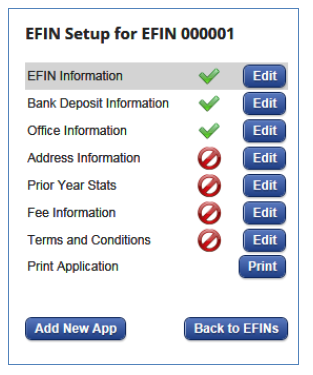
The Navigation Pane centralizes the ERO/Bank Enrollment records and allows you to navigate directly to any section of the ERO Enrollment by clicking the "Edit" button. Complete each section to get setup with sbtpg.

Completed sections will show a green check.

Incomplete sections will show a red circle with a line through it.

Locked sections will show a lock and will appear once the bank application has been submitted.

Print Application Button – Will print the Bank Application for the ERO to review prior to submitting the application.

Back to EFINs Button – Takes you back to the ERO EFIN Management List.
Download Crosslink instructions here
EFIN setup panel

Step 4

Once you have successfully completed each step, click the "Submit Bank Application" button to send the Bank Enrollment Application to sbtpg.
Visit the Crosslink website

About Us

About

News

Careers

Privacy

Your Privacy ChoicesYour Privacy Choices icon

Contact Us

Tax Pro Support (New to sbtpg)

Contact Us

Tax Pro Support (Existing client)

800.779.7228

Taxpayer Support

800.901.6663

Enrollment

Enroll now

Upgrade to sbtpg

Support

Tax Professionals

Tax Pro Information

Tax Pro Website

Tax Pro Help Center

Taxpayers

Taxpayer Website

Taxpayer Help Center

Check Cashing Establishments

Check Verification

Products

Auto Collect

Credit and Debit Card Processing

Credit Card

Cybersecurity

Fast Cash Advance

Green Dot Prepaid Visa® Card

Marketing Pro

PreSeason Funds

Refund Transfer

Simply Paid

Software Purchase Assistance

Tax Debt Resolution

Marketing Resources

Marketing Materials

Marketing Playbook

Tax Pro Search

Join our mailing list

©2026 Santa Barbara Tax Products Group, all rights reserved.

PO Box 508 West Chester, OH 45071  |  A Green Dot Company  | Online Privacy Statement | Site Terms of Use

  • Upgrade to sbtpg
  • Enroll with sbtpg
  • Products
    • Auto Collect
    • Credit Card
    • Credit/Debit Card Processing
    • All-in-one cybersecurity
    • Fast Cash Advance
    • Fast Forward
    • Green Dot® Prepaid Visa® Card
    • Marketing Materials
    • Marketing Pro
    • PreSeason Funds
    • Refund Transfer
    • Simply Paid
    • Software Purchase Assistance
    • Tax Debt Resolution
  • About Us
    • About sbtpg
    • News
  • Support
    • Contact Us
    • Help
  • Log in