
Skip to content
sbtpg logo
  • Products
    Digital payment
    COLLECT TAX PREP FEES
    Refund Transfer

    Offer a pay-by-refund option

    Auto Collect

    Collect past-due tax preparation fees

    Credit and Debit Card Processing

    Accept payment by credit card or debit card

    Cash
    INCREASED CASH FLOW
    Software Purchase Assistance

    Buy tax software with a no cost loan

    Pre Season Funds

    Get an advance before tax season

    Simply Paid

    Get paid early with a fee advance

    revshare
    GET PAID FOR REFERRALS
    Tax Debt Resolution

    Help clients with tax debt

    Yendo Credit Card

    Offer a vehicle-secured credit card

    Satisfied
    PRODUCTS FOR YOUR CLIENTS
    Fast Cash Advance

    Offer a refund advance loan

    Fast Forward

    Give clients early access to their refund

    Green Dot® Prepaid Visa® Card

    Help clients receive their refund fast

    Approved notification
    TOOLS FOR TAX PROS
    NEW! AI data entry

    Prepare returns faster than ever with AI

    Cybersecurity

    Safeguard client data and protect your practice

    Process more tax returns
    MARKETING RESOURCES
    Marketing Pro

    Power your marketing campaigns

    Marketing Materials

    Access promotional resources

    Marketing Playbook

    Unlock free marketing tips and tricks

    Successful ERO

    Upgrade now

    See all we offer tax pros

    Discover the difference
  • Support
    • Help
    • Contact us
  • About us
    • About us
    • News
Log in
Enroll now

How to enroll with TPG

Instructions for Drake Software clients using Software Purchase Assistance (SPA)

Not using SPA? Click here for enrollment instructions

Step 1

Go to https://support.drakesoftware.com/ and log in with your Drake username and password.
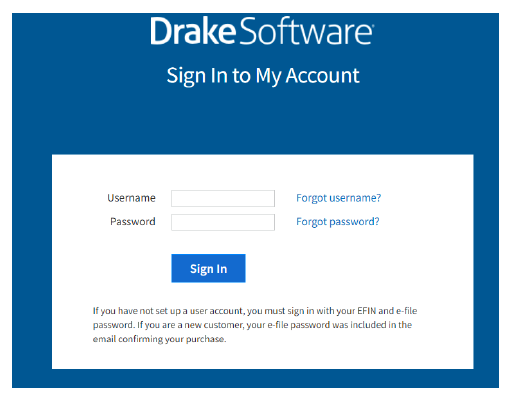
Drake login page

Step 2

Click on 'Account' to display the drop-down options.
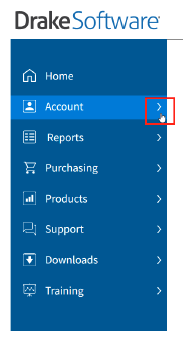
Drake options

Step 3

Select "Software Purchase Assistance".
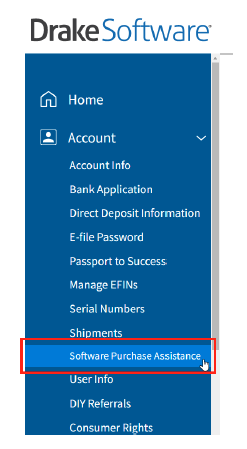
SPA

Step 4

Select sbtpg when prompted to select a bank.
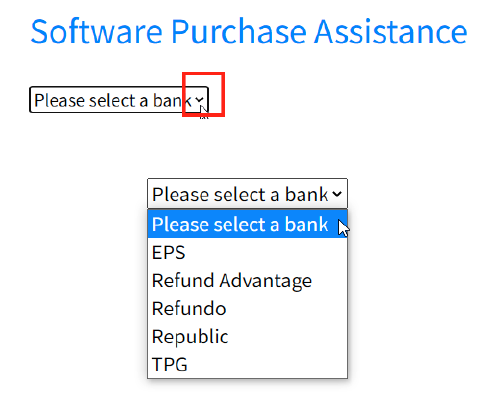
TPG

Step 5

Complete all information and click the "Submit" button at the bottom of the screen (agreement language on website may vary from example below).
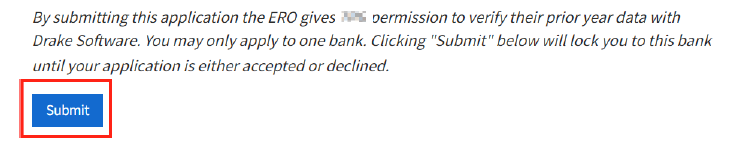
Example

Step 6

You may be required to agree to the terms of our Software Purchase Assistance agreement before you can submit the application. Click on the blue link to open the agreement.

Example 2
Read the agreement carefully and then close the agreement and you will be returned to where you can now click the box indicating that you want to enroll in the SPA program.

Example 3
If you do NOT click on the blue link to bring up the agreement, you cannot click the box indicating that you want to enroll in the SPA program.


Now you are ready to submit your application (agreement language on website may vary from example below).
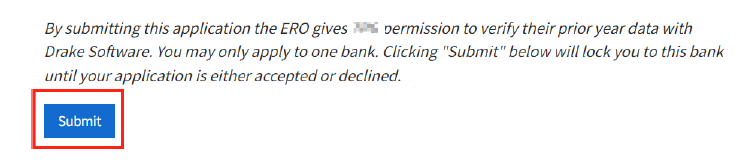
Example 4
Once submit your application and are approved Drake will provide guidance for completing your setup with sbtpg.
Enrollment instructions for Prep Paid customers
Visit the Drake Software website

About Us

About

News

Careers

Privacy

Your Privacy ChoicesYour Privacy Choices icon

Contact Us

Tax Pro Support (New to sbtpg)

Contact Us

Tax Pro Support (Existing client)

800.779.7228

Taxpayer Support

800.901.6663

Enrollment

Enroll now

Upgrade to sbtpg

Support

Tax Professionals

Tax Pro Information

Tax Pro Website

Tax Pro Help Center

Taxpayers

Taxpayer Website

Taxpayer Help Center

Check Cashing Establishments

Check Verification

Products

Auto Collect

Credit and Debit Card Processing

Credit Card

Cybersecurity

Fast Cash Advance

Green Dot Prepaid Visa® Card

Marketing Pro

PreSeason Funds

Refund Transfer

Simply Paid

Software Purchase Assistance

Tax Debt Resolution

Marketing Resources

Marketing Materials

Marketing Playbook

Tax Pro Search

Join our mailing list

©2026 Santa Barbara Tax Products Group, all rights reserved.

PO Box 508 West Chester, OH 45071  |  A Green Dot Company  | Online Privacy Statement | Site Terms of Use

  • Upgrade to sbtpg
  • Enroll with sbtpg
  • Products
    • Auto Collect
    • Credit Card
    • Credit/Debit Card Processing
    • All-in-one cybersecurity
    • Fast Cash Advance
    • Fast Forward
    • Green Dot® Prepaid Visa® Card
    • Marketing Materials
    • Marketing Pro
    • PreSeason Funds
    • Refund Transfer
    • Simply Paid
    • Software Purchase Assistance
    • Tax Debt Resolution
  • About Us
    • About sbtpg
    • News
  • Support
    • Contact Us
    • Help
  • Log in